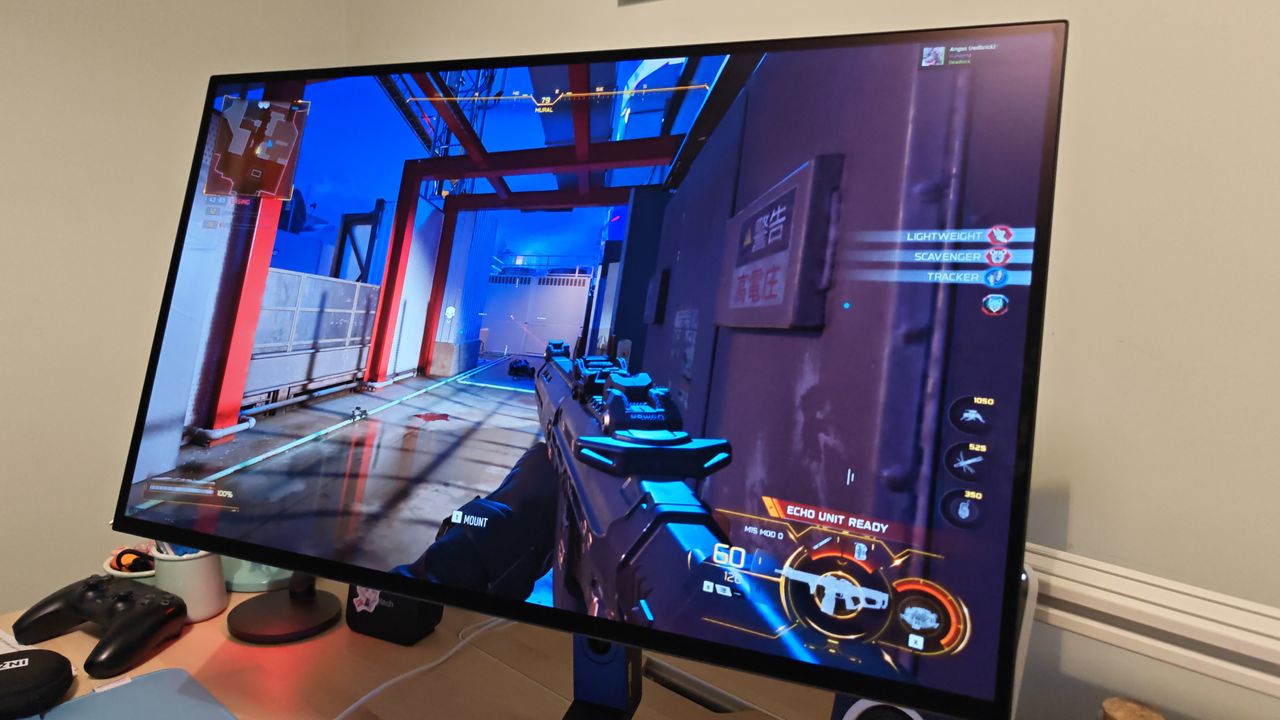
I didn't think the Inzone M10S gaming monitor could get much better, then I tried the new Inzone M10S 2
Sony Inzone M10S 2: Two-minute review The Sony Inzone M10S was one of the best gaming monitors of 2024, offering uncompromising performance and a suite of practical tournament-ready features that made it the perfect choice for both professional and aspiring esports players.
<![CDATA[ <article> <h2 class="article-body__section" id="section-sony-inzone-m10s-2-two-minute-review"><span>Sony Inzone M10S 2: Two-minute review</span></h2><p>The Sony Inzone M10S was one of the <a href="https://www.techradar.com/news/best-gaming-monitor">best gaming monitors</a> of 2024, offering uncompromising performance and a suite of practical tournament-ready features that made it the perfect choice for both professional and aspiring esports players. </p><p>Now Sony is back with the Inzone M10S 2, a successor that delivers a number of small but nevertheless impactful upgrades while maintaining everything that made the original so good. It’s the same 2560 x 1440 resolution, but feels even snappier thanks to an increased 540Hz refresh rate and a lower 0.02ms response time. There’s even a dual mode, letting you bump the resolution down to 720p for a staggering 720Hz picture — invaluable for <a href="https://www.techradar.com/gaming/counter-strike-2-review-clicking-heads"><em>Counter-Strike 2</em></a><em> </em>or <em>Rocket League</em>.</p><p>If that wasn’t enough, it’s now even brighter, coming in at up to 1,500 nits rather than 1,300, with the same rich colors and impressive contrast. There’s a new anti-glare coating on this model as well, which does a fantastic job of keeping glare at bay. You barely see any kind of reflections, even in a brightly lit room with ring lights and lamps pointed directly at the screen, preventing possible distractions in a tournament setting. </p><p>I did note that the matte texture makes it prone to smudging and quite hard to clean, though, which might be a little frustrating if you accidentally touch the panel while setting up.</p><figure class="van-image-figure inline-layout" data-bordeaux-image-check ><div class='image-full-width-wrapper'><div class='image-widthsetter' style="max-width:2342px;"><p class="vanilla-image-block" style="padding-top:56.23%;"><img id="P8z9US7Fjwen6roJ7SbgXd" name="IMG_20260714_221455_edit_817664947463292" alt="The Sony Inzone M10S 2 monitor at a desk setup." src="https://cdn.mos.cms.futurecdn.net/P8z9US7Fjwen6roJ7SbgXd.jpg" mos="" align="middle" fullscreen="" width="2342" height="1317" attribution="" endorsement="" class="inline"></p></div></div><figcaption itemprop="caption description" class=" inline-layout"><span class="credit" itemprop="copyrightHolder">(Image credit: Future)</span></figcaption></figure><p>Like its predecessor, the Inzone M10S 2 is packed with handy esports features like a dedicated 24.5-inch display mode, the ability to set up on-screen timers and crosshairs, or an option to display a frame rate counter to check your performance. </p><p>They’re all accessible via the monitor’s options menu, or the easy-to-use Inzone Hub software. The software even lets you import and export your setup, meaning you can take your at-home profile to a competition and access the exact same settings every time. </p><p>As this is a Sony product, it shouldn't come as much of a surprise that it also has a dedicated <a href="https://www.techradar.com/reviews/ps5">PlayStation 5</a> mode, which is activated automatically when the system is plugged in and optimizes the picture for console play.</p><p>It’s all brought together by a market-leading stand. The base included with the original Sony Inzone M10S is one of the best I’ve ever used, with a low-profile disc-shaped base that fits underneath your keyboard, plenty of vertical adjustment, and a full 360 degrees of rotation. The version that comes with the Inzone M10S is even better, benefiting from an additional few degrees of tilt to ensure a comfortable viewing experience no matter how you’re seated.</p><figure class="van-image-figure inline-layout" data-bordeaux-image-check ><div class='image-full-width-wrapper'><div class='image-widthsetter' style="max-width:4096px;"><p class="vanilla-image-block" style="padding-top:56.25%;"><img id="CuxLxVf9voCxYAsVCvEKzd" name="IMG_20260714_213516_edit_817710740283743" alt="The Sony Inzone M10S 2 monitor at a desk setup." src="https://cdn.mos.cms.futurecdn.net/CuxLxVf9voCxYAsVCvEKzd.jpg" mos="" align="middle" fullscreen="" width="4096" height="2304" attribution="" endorsement="" class="inline"></p></div></div><figcaption itemprop="caption description" class=" inline-layout"><span class="credit" itemprop="copyrightHolder">(Image credit: Future)</span></figcaption></figure><h2 class="article-body__section" id="section-sony-inzone-m10s-2-price-and-availability"><span>Sony Inzone M10S 2: Price and availability</span></h2><ul><li><strong>Costs $1,099.99 / £1,199 / roughly AU$2,300</strong></li><li><strong>Same price that the original M10S launched at</strong></li><li><strong>The older model is now cheaper, though</strong></li></ul><p>The Sony Inzone M10S 2 is far from cheap, but it’s not really competing with most other gaming monitors. You can easily find capable 4K screens for far less than this price, such as the <a href="https://www.techradar.com/reviews/gigabyte-m32uc">Gigabyte M32UC</a>, which is going to be a better fit for those seeking to play cinematic games like <a href="https://www.techradar.com/reviews/horizon-forbidden-west"><em>Horizon Forbidden West</em></a><em> </em>or <a href="https://www.techradar.com/reviews/the-last-of-us-part-1-review"><em>The Last of Us Part 1</em></a><em> </em>on PC or console.</p><p>The Inzone M10S 2 is instead positioned as an alternative to models offered by dedicated esports brands such as BenQ Zowie. The Zowie XL2586X+ is a good point of comparison, as it’s very similarly priced at roughly $1,000 / £1,150 / AU$1,799. That model features a 600Hz 1080p TN panel designed for the best possible motion clarity. While technically faster, you lose out on the higher-resolution picture, more vibrant OLED colors, and stylish design of the M10S 2.</p><p>If you’re looking at the Inzone M10S 2, then the original<a href="https://www.techradar.com/gaming/sony-inzone-m10s-review"> Sony Inzone M10S</a>, which is still sold alongside this newer model, is also a viable alternative. The M10S is now easy to find around $900 / £990 / roughly AU$1,600, so it comes in a decent chunk cheaper — though you do lose the spec upgrades.</p><h2 class="article-body__section" id="section-sony-inzone-m10s-2-specs"><span>Sony Inzone M10S 2: Specs</span></h2><div ><table><tbody><tr><td class="firstcol empty" ></td><td ><p><strong>Sony Inzone M10S 2</strong></p></td></tr><tr><td class="firstcol " ><p><strong>Price</strong></p></td><td ><p>$1,099.99 / £1,199 / roughly AU$2,300</p></td></tr><tr><td class="firstcol " ><p><strong>Panel size</strong></p></td><td ><p>26.5in / 67.3cm</p></td></tr><tr><td class="firstcol " ><p><strong>Panel type</strong></p></td><td ><p>OLED</p></td></tr><tr><td class="firstcol " ><p><strong>Resolution</strong></p></td><td ><p>2560 x 1440</p></td></tr><tr><td class="firstcol " ><p><strong>Brightness</strong></p></td><td ><p>1,500 nit</p></td></tr><tr><td class="firstcol " ><p><strong>HDR</strong></p></td><td ><p>HDR10</p></td></tr><tr><td class="firstcol " ><p><strong>Pixel response</strong></p></td><td ><p>0.02 ms gray-to-gray</p></td></tr><tr><td class="firstcol " ><p><strong>Refresh rate</strong></p></td><td ><p>540Hz (or 720Hz HD)</p></td></tr></tbody></table></div><h2 class="article-body__section" id="section-sony-inzone-m10s-2-design-and-features"><span>Sony Inzone M10S 2: Design and features</span></h2><ul><li><strong>Sleek and attractive</strong></li><li><strong>Brilliant included stand</strong></li><li><strong>Wealth of ports</strong></li></ul><p>The design of the Sony Inzone M10S 2 hasn’t changed that much from the original M10S — but that’s certainly not a bad thing. This is a sleek and attractive-looking monitor that comes bundled with a fantastic stand. Its base is a low-profile, 4 mm thin metal disk that fits comfortably underneath a keyboard and connects to a robust stand that keeps the monitor impressively stable.</p><p>You get the same full 360-degree rotation too, so you can freely show your screen to teammates in a match. The large power button and the thumbstick used to edit settings are still as intuitive and easy to use as before, and it retains smart design features like a power indicator LED that’s set off to the side so that it doesn’t shine in your eyes as you play.</p><p>The ports are identical to the original M10S as well: DisplayPort, two HDMI 2.1 ports, an upstream USB Type-C alongside two downstream USB Type-A ports for peripherals, a 3.5mm audio jack, and a single USB Type-A port reserved for software updates (accomplished with a USB stick). Its major software features are also unchanged, so you still get support for Nvidia G-Sync, HDR, and a suite of visual modes including an FPS Pro+ mode developed in collaboration with esports team Fnatic. </p><p>This isn’t the best looking aesthetically, but it makes it far easier to see key visual cues like the red dots that indicate rival players in a match of <a href="https://www.techradar.com/news/live/call-of-duty-black-ops-7-launch-live"><em>Call of Duty: Black Ops 7</em></a><em> </em>or even obscured enemies in <em>Valorant</em>.</p><p>In terms of what’s actually new, it’s a subtle distinction but the M10S 2 benefits from a wider -5 to 35 degree tilt range (its predecessor tilted at -5 to 25 degrees), which allows for even more flexibility in your seating position (the monitor also supports a 100 x 100 mm VESA mount, if you would prefer to use a third-party arm).</p><p>The Inzone M10S 2 is also coated with a new ‘Super Anti-glare Film’. It’s incredibly effective, and means you can play unimpeded with a literal torch pointed at the display. The matte texture does make it very prone to picking up smudges, though.</p><figure role="gallery"><figure><img src="https://cdn.mos.cms.futurecdn.net/AaYdPrLLfKJyGJqUTYJezd.jpg" alt="The Sony Inzone M10S 2 monitor at a desk setup." /><figcaption><small role="credit">Future</small></figcaption></figure><figure><img src="https://cdn.mos.cms.futurecdn.net/FYN5hwAjzXtTEY7i8gMczd.jpg" alt="The Sony Inzone M10S 2 monitor at a desk setup." /><figcaption><small role="credit">Future</small></figcaption></figure></figure><h2 class="article-body__section" id="section-sony-inzone-m10s-2-performance"><span>Sony Inzone M10S 2: Performance</span></h2><ul><li><strong>540Hz refresh rate is incredibly smooth</strong></li><li><strong>Beautiful, vibrant colors and strong brightness</strong></li><li><strong>Perfect for competitive games</strong></li></ul><p>The Sony Inzone M10S 2 looks pretty dim and unimpressive out of the box. The culprit? The power-saving mode is on by default. Once you turn that off and crank the brightness up to about 80%, the vibrant OLED colors are absolutely lush and look gorgeous. The sRGB profile is a good choice if you want color accuracy, and is usually my preference when using monitors, but I found the slightly poppier appearance of the standard preset very appealing.</p><p>The enhanced brightness of this model is immediately noticeable compared to the original M10s and, along with the effective anti-glare coating, ensures that the picture remains visible in even harsh lighting conditions like direct sunlight or with the display positioned next to a desk lamp.</p><p>In games, the performance is simply perfect. The 540Hz refresh rate is beautifully smooth, and motion is impressively clear. It elevates titles like <em>Counter-Strike 2</em>, where the enhanced smoothness genuinely helps with target tracking. The 0.02ms GtG response time certainly helps everything feel snappy, and sits among the fastest on the market.</p><figure class="van-image-figure inline-layout" data-bordeaux-image-check ><div class='image-full-width-wrapper'><div class='image-widthsetter' style="max-width:4096px;"><p class="vanilla-image-block" style="padding-top:56.25%;"><img id="6mo5PJvXdb62L2FrRb3w5e" name="IMG_20260714_221743_edit_817633741337887" alt="The Sony Inzone M10S 2 monitor at a desk setup." src="https://cdn.mos.cms.futurecdn.net/6mo5PJvXdb62L2FrRb3w5e.jpg" mos="" align="middle" fullscreen="" width="4096" height="2304" attribution="" endorsement="" class="inline"></p></div></div><figcaption itemprop="caption description" class=" inline-layout"><span class="credit" itemprop="copyrightHolder">(Image credit: Future)</span></figcaption></figure><p>Although my <a href="https://www.techradar.com/reviews/nvidia-geforce-rtx-4080">Nvidia RTX 4080</a> Ti-powered rig didn’t break a sweat achieving a stable 540fps frame rate at 1440p, you can comfortably lower the resolution to 1080p and maintain a decent level of picture quality — especially in the dedicated 23.5-inch display mode. Things feel even better if you take advantage of the dual-mode feature and crank it up even further to 720Hz at 720p, though this does come at a noticeable cost to picture quality.</p><p>Competitive first-person shooter titles are what this monitor was made for, but that doesn’t mean that it delivers poor performance in other genres. The grim world of <a href="https://www.techradar.com/gaming/warhammer-40000-space-marine-2-review"><em>Warhammer: 40,000 Space Marine 2</em></a><em> </em>looked absolutely gorgeous with expressive colors and strong contrast, while <a href="https://www.techradar.com/gaming/forza-horizon-6-review"><em>Forza Horizon 6</em></a><em> </em>benefitted hugely from the smoothness of VRR. </p><p>Even if I wouldn’t recommend buying the Inzone M10S 2 exclusively to play those kinds of games when cheaper 4K options are available, it’s good to know that you will still be able to enjoy a wide range of titles if you’re an aspiring esports player who picks one up for both practice sessions and home use.</p><h2 class="article-body__section" id="section-should-you-buy-the-sony-inzone-m10s-2"><span>Should you buy the Sony Inzone M10S 2?</span></h2><h2 id="buy-it-if">Buy it if...</h2><div class="product"><p><strong>You need the best esports performance</strong><br>The Sony Inzone M10S 2 is perfect for competitive play thanks to its smooth 540Hz refresh, excellent motion clarity, and suite of tournament-ready software features. </p></div><div class="product"><p><strong>You want a versatile display as well</strong><br>When you’re not practicing for your next tournament, the Sony Inzone M10S 2 is still a capable display with vibrant OLED colors that benefit a wide range of genres.</p></div><div class="product"><p><strong>You’re after top-tier design</strong><br>Although the design of the Sony Inzone M10S 2 is almost identical to its predecessor, that’s not a bad thing. Its stand is still one of the best on the market</p></div><h2 id="don-t-buy-it-if">Don't buy it if...</h2><div class="product"><p><strong>You’re not serious about competitive play</strong><br>When you’re spending this amount of money on a display, you need to be serious about competitive play. Otherwise, there are cheaper 4K options available that are better suited to general use.</p></div><h2 id="also-consider">Also consider</h2><p>Here’s how the Sony Inzone M10S 2 stacks up against the original model, plus a 4K alternative for those that want something for more general use.</p><div ><table><tbody><tr><td class="firstcol empty" ></td><td ><p><strong>Sony Inzone M10S 2</strong></p></td><td ><p><strong>Sony Inzone M10S</strong></p></td><td ><p><strong>Gigabyte M32UC</strong></p></td></tr><tr><td class="firstcol " ><p><strong>Price</strong></p></td><td ><p>$1,099.99 / £1,199 / roughly AU$2,300</p></td><td ><p>~$900 / £990 / around AU$1,900 </p></td><td ><p>$799 / £681 / around AU$1,500</p></td></tr><tr><td class="firstcol " ><p><strong>Panel size</strong></p></td><td ><p>26.5in / 67.3cm</p></td><td ><p>26.5in / 67.3cm</p></td><td ><p>32in / 81.3cm</p></td></tr><tr><td class="firstcol " ><p><strong>Panel type</strong></p></td><td ><p>OLED</p></td><td ><p>OLED</p></td><td ><p>LCD</p></td></tr><tr><td class="firstcol " ><p><strong>Resolution</strong></p></td><td ><p>2560 x 1440</p></td><td ><p>2560 x 1440</p></td><td ><p>3840 x 2160</p></td></tr><tr><td class="firstcol " ><p><strong>Brightness</strong></p></td><td ><p>1,500 nit</p></td><td ><p>1300 nit</p></td><td ><p>350 nits</p></td></tr><tr><td class="firstcol " ><p><strong>HDR</strong></p></td><td ><p>HDR True Black 400</p></td><td ><p>HDR True Black 400</p></td><td ><p>HDR True Black 400</p></td></tr><tr><td class="firstcol " ><p><strong>Pixel response</strong></p></td><td ><p>0.02 ms gray-to-gray</p></td><td ><p>0.03ms gray-to-gray</p></td><td ><p>1 ms</p></td></tr><tr><td class="firstcol " ><p><strong>Refresh rate</strong></p></td><td ><p>540Hz (or 720Hz HD)</p></td><td ><p>480Hz</p></td><td ><p>144Hz</p></td></tr></tbody></table></div><div class="product"><p><strong>Sony Inzone M10S</strong><br>The original Sony Inzone M10S is now available for a bit cheaper than the M10S 2. You lose a few key upgrades, but it’s worth considering if you want to spend a little less on an otherwise capable esports display.</p><p><strong>Read our full </strong><a href="https://www.techradar.com/gaming/sony-inzone-m10s-review" data-dimension112="90639840-91a9-11f1-a499-7dda2eddf450" data-action="Deal Block" data-label="Read our full Sony Inzone M10S review" data-dimension48="Read our full Sony Inzone M10S review" data-dimension25=""><strong>Sony Inzone M10S review</strong></a></p></div><div class="product"><p><strong>Gigabyte M32UC</strong><br>The Gigabyte M32UC is the monitor I point to when I recommend something for general use. It’s 4K at 144Hz and perfect for PS5 and PC. It’s not a good fit for esports, but it’s much cheaper than the Inzone M10S 2.</p><p><strong>Read our full </strong><a href="https://www.techradar.com/reviews/gigabyte-m32uc" data-dimension112="9063989a-91a9-11f1-9f59-bd0b9829b6b0" data-action="Deal Block" data-label="Read our full Gigabyte M32UC review" data-dimension48="Read our full Gigabyte M32UC review" data-dimension25=""><strong>Gigabyte M32UC review</strong></a></p></div><h2 class="article-body__section" id="section-how-i-tested-the-sony-inzone-m10s-2"><span>How I tested the Sony Inzone M10S 2</span></h2><ul><li><strong>Tested for over two weeks</strong></li><li><strong>Used as primary display</strong></li><li><strong>Evaluated with a wide range of games </strong></li></ul><p>I tested the Sony Inzone M10S for more than two weeks, using it as my primary monitor for PC, PS5, and <a href="https://www.techradar.com/reviews/xbox-series-x">Xbox Series X</a>. Throughout my time with it, I tested a wide range of titles, ranging from esports favorites <em>Counter-Strike 2, Rocket League, Fortnite</em>, and<em> Tom Clancy’s Rainbow Six Siege </em>to popular shooters such as <em>Battlefield 6 </em>and <a href="https://www.techradar.com/gaming/call-of-duty-black-ops-7-review"><em>Call of Duty: Black Ops 7</em></a>.</p><p> I also tried a selection of more traditional games, such as <a href="https://www.techradar.com/gaming/assassins-creed-shadows-review"><em>Assassin’s Creed Shadows</em></a> and <a href="https://www.techradar.com/gaming/stellar-blade-review"><em>Stellar Blade</em></a><em>, </em>to elevate its more general performance. During my time with the monitor, I endeavored to test each of its available features using both the built-in settings options and the compatible Inzone Hub software.</p><p><a href="https://www.techradar.com/news/how-we-test">Read more about how we test</a></p><p><em>First reviewed August 2026</em></p> </article> ]]>
Read the full article on TechRadar
Read Full Article →