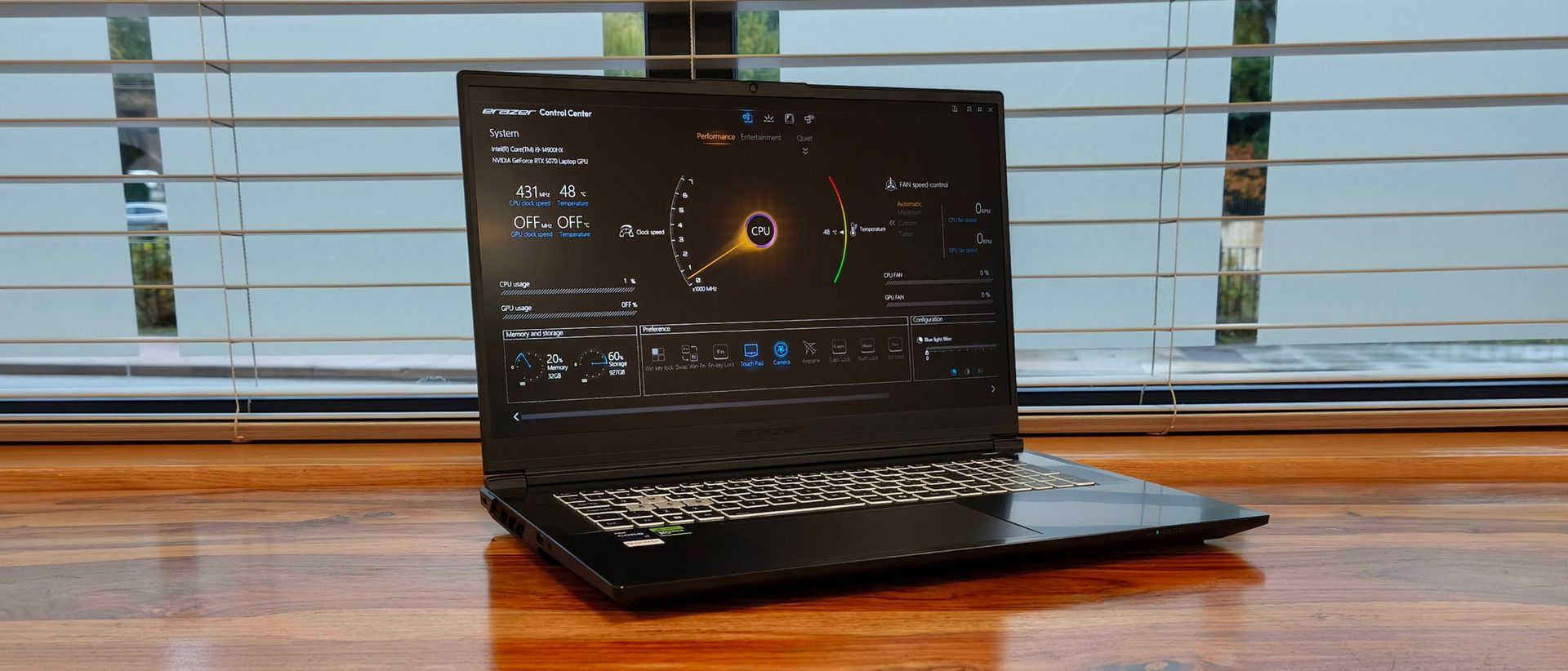
Medion Erazer Defender 17 P10 review: Cutting corners in the right places
Medion Erazer Defender 17 P10: Two-minute review The Erazer Defender 17 P10 is a large and powerful gaming laptop with a price tag one could consider ‘budget’ when judging it against its rivals.
<![CDATA[ <article> <h2 class="article-body__section" id="section-medion-erazer-defender-17-p10-two-minute-review"><span>Medion Erazer Defender 17 P10: Two-minute review</span></h2><p>The Erazer Defender 17 P10 is a large and powerful gaming laptop with a price tag one could consider ‘budget’ when judging it against its rivals.</p><p>It doesn’t look particularly exciting or stylish. There are a few discreet elements that evoke a gaming focus, but otherwise the P10’s design is purely functional. It doesn’t employ the most premium of materials, either, though the whole unit is reassuringly solid, save for the keyboard, which flexes considerably when you use it. And while it’s hardly the most portable device, there are worse 17-inch gaming machines to carry around.</p><p>One of the benefits of this large size, though, is the space available for ports. On the rear of the Erazer Defender 17 P10 there are power, HDMI, and Ethernet connections, as well as a USB-C port that supports DisplayPort 1.4. On the right is another USB-C port that also supports DisplayPort 1.4, as well as Power Delivery. Two USB-A ports are featured on both sides, too, and the left side also gets a headset jack.</p><p>When it comes to the business of gaming, the Erazer Defender 17 P10 is very capable. It managed to run various AAA titles at very high frame rates — above 60fps in many cases — with demanding graphics settings applied. More impressive is its cooling, although the price paid for this is persistent, if innocuous, fan noise.</p><figure class="van-image-figure inline-layout" data-bordeaux-image-check="" ><div class='image-full-width-wrapper'><div class='image-widthsetter' style="max-width:1905px;"><p class="vanilla-image-block" style="padding-top:56.27%;"><img id="CNHh8W5g7bNbK4ESLBAuP7" name="Imported image 1 - 1792587081106" alt="Medion Erazer Defender 17 P10" src="https://cdn.mos.cms.futurecdn.net/CNHh8W5g7bNbK4ESLBAuP7-1920-80.jpg" mos="" align="middle" fullscreen="" width="1905" height="1072" attribution="" endorsement="" class="inline" /></p></div></div><figcaption itemprop="caption description" class=" inline-layout"><span class="credit" itemprop="copyrightHolder">(Image credit: Future)</span></figcaption></figure><p>Despite its unspectacular 1080p resolution and lack of OLED tech (although this is a rarity for gaming laptops at this price point), the display also impressed me. Its vibrancy shows off games and other content in all their glory, and while its resolution isn’t the sharpest, it’s sharp enough to provide sufficient fidelity across the 17-inch real estate.</p><p>The keyboard is great to use for both gaming and typing, thanks to the snappy and low-traveling — yet tactile — keys. That aforementioned flexing feels a little strange at first, but it actually provides cushioning and dampening, helping to nullify the harshness of furious presses. The touchpad is equally capable, thanks to its smooth surface, responsiveness, and large surface area. </p><p>The battery life is on par for what you would expect of a gaming laptop — which is to say it’s not great. It lasted five and a half hours in our movie playback test, which is 40 minutes better than what the Medion Erazer Major 16 X1 achieved, although less than half the time posted by the Asus V16, a much cheaper gaming laptop.</p><p>This aspect aside, though, the Erazer Defender 17 P10 is a strong performer with a welcome price tag relative to its spec. You’ll have to settle for an unspectacular design and a poor battery life, but if you think these aspects are worth sacrificing for gaming prowess, then the Erazer Defender 17 P10 represents good value in the large gaming laptop sector.</p><figure class="van-image-figure inline-layout" data-bordeaux-image-check="" ><div class='image-full-width-wrapper'><div class='image-widthsetter' style="max-width:1905px;"><p class="vanilla-image-block" style="padding-top:56.27%;"><img id="oeh5M4ch5osGdsu66E2dS7" name="Imported image 2 - 1792587081107" alt="Medion Erazer Defender 17 P10" src="https://cdn.mos.cms.futurecdn.net/oeh5M4ch5osGdsu66E2dS7-1920-80.jpg" mos="" align="middle" fullscreen="" width="1905" height="1072" attribution="" endorsement="" class="inline" /></p></div></div><figcaption itemprop="caption description" class=" inline-layout"><span class="credit" itemprop="copyrightHolder">(Image credit: Future)</span></figcaption></figure><h2 class="article-body__section" id="section-medion-erazer-defender-17-p10-review-price-availability"><span>Medion Erazer Defender 17 P10 review: Price & availability</span></h2><ul><li><strong>Starts from £1,649.99 (about $2,200 / AU$3,150)</strong></li><li><strong>Available now in the UK only</strong></li><li><strong>Reasonable price for the spec</strong></li></ul><p>The P10 starts from £1,649.99 (about $2,200 / AU$3,150) and is available in the UK only. The base model features an Intel Core i9-14900HX, an Nvidia GeForce RTX 5060, 16GB of RAM, and 1TB of storage. The higher-spec model costs £1,899.97 (about $2,500 / AU$3,600), and gets an RTX 5070 and 32GB of RAM.</p><p>This is a reasonable price when you compare the Erazer Defender 17 P10 to other gaming laptops of a similar spec and size. There are a few budget offerings that rival its value for money, though: one of them is another Erazer model, the <a href="https://www.techradar.com/computing/gaming-laptops/medion-erazer-major-16-x1-review">Major 16 X1</a>. This is more expensive than the top P10 model, but its spec is better across the board, with its Intel Core Ultra 9, RTX 5070 Ti, 32GB of RAM, and 2TB of storage, not to mention its much sharper — but inch smaller — 1600p display.</p><p>There’s also the <a href="https://www.techradar.com/computing/gaming-laptops/asus-v16-review">Asus V16</a> for bargain hunters to consider, which we rate as one of the <a href="https://www.techradar.com/best/best-cheap-gaming-laptops-2020-the-5-top-affordable-gaming-laptops">best budget gaming laptop</a> picks around. This is much cheaper than any Erazer Defender 17 P10 model, but you’ll have to settle for a 40-series RTX, and it too has a smaller 16-inch display.</p><h2 class="article-body__section" id="section-medion-erazer-defender-17-p10-review-specs"><span>Medion Erazer Defender 17 P10 review: Specs</span></h2><div ><table><tbody><tr><td class="firstcol empty" ></td><td ><p><strong>Medion Erazer Defender 17 P10 base spec</strong></p></td><td ><p><strong>Medion Erazer Defender 17 P10 review spec</strong></p></td></tr><tr><td class="firstcol " ><p>Price</p></td><td ><p>£1,649.99 (about $2,200 / AU$3,150)</p></td><td ><p>£1,899.97 (about $2,500 / AU$3,600)</p></td></tr><tr><td class="firstcol " ><p>CPU</p></td><td ><p>Intel Core i9-14900HX (up to 5.8GHz, 24 cores)</p></td><td ><p>Intel Core i9-14900HX (up to 5.8GHz, 24 cores)</p></td></tr><tr><td class="firstcol " ><p>Graphics</p></td><td ><p>NVIDIA GeForce RTX 5060 Laptop GPU (8GB GDDR7)</p></td><td ><p>NVIDIA GeForce RTX 5070 Laptop GPU (8GB GDDR7)</p></td></tr><tr><td class="firstcol " ><p>RAM</p></td><td ><p>16GB DDR5</p></td><td ><p>32GB DDR5</p></td></tr><tr><td class="firstcol " ><p>Screen</p></td><td ><p>17.3-inch HD (1920 x 1080) IPS LCD, 16:9, 144Hz</p></td><td ><p>17.3-inch HD (1920 x 1080) IPS LCD, 16:9, 144Hz</p></td></tr><tr><td class="firstcol " ><p>Storage</p></td><td ><p>1TB PCIe 4.0 NVMe M.2</p></td><td ><p>1TB PCIe 4.0 NVMe M.2</p></td></tr><tr><td class="firstcol " ><p>Ports</p></td><td ><p>1x power adapter, 2x USB-C (1x 3.2 Gen 2 (DisplayPort / Power Delivery), 1x 3.2 Gen 2 (DisplayPort)), 2x USB-A (1x 3.2 Gen 2, 1x 3.2 Gen 1), 1x HDMI, 1x RJ-45, 1x 3.5mm combo audio</p></td><td ><p>1x power adapter, 2x USB-C (1x 3.2 Gen 2 (DisplayPort / Power Delivery), 1x 3.2 Gen 2 (DisplayPort)), 2x USB-A (1x 3.2 Gen 2, 1x 3.2 Gen 1), 1x HDMI, 1x RJ-45, 1x 3.5mm combo audio</p></td></tr><tr><td class="firstcol " ><p>Wireless</p></td><td ><p>Wi-Fi 6E, Bluetooth 5.3</p></td><td ><p>Wi-Fi 6E, Bluetooth 5.3</p></td></tr><tr><td class="firstcol " ><p>Battery</p></td><td ><p>53Wh</p></td><td ><p>53Wh</p></td></tr><tr><td class="firstcol " ><p>Weight</p></td><td ><p>6 lbs / 2.7kg</p></td><td ><p>6 lbs / 2.7kg </p></td></tr><tr><td class="firstcol " ><p>Dimensions</p></td><td ><p>15.63 x 11.26 x 1.04 inches / 397 x 286 x 26.5mm</p></td><td ><p>15.63 x 11.26 x 1.04 inches / 397 x 286 x 26.5mm</p></td></tr></tbody></table></div><figure class="van-image-figure inline-layout" data-bordeaux-image-check="" ><div class='image-full-width-wrapper'><div class='image-widthsetter' style="max-width:1905px;"><p class="vanilla-image-block" style="padding-top:56.27%;"><img id="NHRGsEYkc7p2a2B7bYstW7" name="Imported image 3 - 1792587081107" alt="Medion Erazer Defender 17 P10" src="https://cdn.mos.cms.futurecdn.net/NHRGsEYkc7p2a2B7bYstW7-1920-80.jpg" mos="" align="middle" fullscreen="" width="1905" height="1072" attribution="" endorsement="" class="inline" /></p></div></div><figcaption itemprop="caption description" class=" inline-layout"><span class="credit" itemprop="copyrightHolder">(Image credit: Future)</span></figcaption></figure><h2 class="article-body__section" id="section-medion-erazer-defender-17-p10-review-design-features"><span>Medion Erazer Defender 17 P10 review: Design & features</span></h2><ul><li><strong>Functional design</strong></li><li><strong>Solid build</strong></li><li><strong>Plenty of ports</strong></li></ul><p>The Erazer Defender 17 P10 has a basic appearance with little fanfare. About the only concessions to style are the RGB keyboard and some gamer-esque cuts and angles around the vents. For the most part, though, this is a utilitarian piece of laptop design.</p><p>While the materials employed aren’t the most premium, the unit is mostly solid, aside from the flexing on the keyboard. And I certainly welcomed the smoothness of the keyboard enclosure when resting my wrists on it.</p><p>Thankfully, the keys are of a higher quality, featuring a subtle texturing and a fetching floating design. As always, I’m glad to see a full-size layout on a laptop, although I would expect nothing less from a 17-inch device. </p><figure class="van-image-figure inline-layout" data-bordeaux-image-check="" ><div class='image-full-width-wrapper'><div class='image-widthsetter' style="max-width:1905px;"><p class="vanilla-image-block" style="padding-top:56.27%;"><img id="v7w8pACesKWiTTsL83pGa7" name="Imported image 4 - 1792587081107" alt="Medion Erazer Defender 17 P10" src="https://cdn.mos.cms.futurecdn.net/v7w8pACesKWiTTsL83pGa7-1920-80.jpg" mos="" align="middle" fullscreen="" width="1905" height="1072" attribution="" endorsement="" class="inline" /></p></div></div><figcaption itemprop="caption description" class=" inline-layout"><span class="credit" itemprop="copyrightHolder">(Image credit: Future)</span></figcaption></figure><p>There are some useful Fn shortcuts on the Function row, and both they and all the other keys can be reprogrammed using the preinstalled Control Center utility software. Granted, this is limited to macro recording with the keys already on the board — far more spartan compared to the <a href="https://www.techradar.com/news/gaming/10-best-gaming-keyboards-1295703">best gaming keyboard</a> software — but it’s uncommon to see any such software for laptop keyboards. </p><p>As you might expect from a 17-inch gaming laptop, the Erazer Defender 17 P10 isn’t exactly the most portable device in the world. However, it’s just about light and thin enough to stuff into a backpack. </p><p>Another more positive expectation you may have from such a machine is a large number of ports, and thankfully the Erazer Defender 17 P10 meets this too. At the back, you’ll find the power adapter socket, flanked on both sides by an Ethernet port, an HDMI port, and a USB-C port that supports the DisplayPort 1.4 standard — practical locations for such connections. </p><p>On the right are two USB ports: one type-A and the other type-C. The latter again supports the DisplayPort 1.4 standard, but with additional Power Delivery support. On the left is another USB-A port and a 3.5mm headset jack. All these side ports are all placed further forward than is typical, which might be a problem for those who don’t like cables protruding from the middle of their laptop.</p><figure class="van-image-figure inline-layout" data-bordeaux-image-check="" ><div class='image-full-width-wrapper'><div class='image-widthsetter' style="max-width:1905px;"><p class="vanilla-image-block" style="padding-top:56.27%;"><img id="7h5ihkp6vVGpDzB5NjgAf7" name="Imported image 5 - 1792587081107" alt="Medion Erazer Defender 17 P10" src="https://cdn.mos.cms.futurecdn.net/7h5ihkp6vVGpDzB5NjgAf7-1920-80.jpg" mos="" align="middle" fullscreen="" width="1905" height="1072" attribution="" endorsement="" class="inline" /></p></div></div><figcaption itemprop="caption description" class=" inline-layout"><span class="credit" itemprop="copyrightHolder">(Image credit: Future)</span></figcaption></figure><h2 class="article-body__section" id="section-medion-erazer-defender-17-p10-review-performance"><span>Medion Erazer Defender 17 P10 review: Performance</span></h2><ul><li><strong>Very capable gaming performance</strong></li><li><strong>Fans are loud but provide great cooling</strong></li><li><strong>Keyboard good for gaming and typing</strong></li></ul><p>The performance of the Erazer Defender 17 P10 is impressive. I managed to get 60-70fps when I played <em>Cyberpunk 2077</em> on the Ray Tracing: Low preset, and it even did an admirable job of handling Ray Tracing: Ultra, giving me around 40 fps, although drops into the thirties and below occurred during more chaotic scenes. </p><p>In order to handle this kind of intensity, the fans fire up at the slightest provocation when they’re set to the Performance mode. But while the noise is certainly noticeable and near-constant, I didn’t find its tone harsh. What’s more, they do a very admirable job of keeping the Erazer Defender 17 P10 cool at all times; no doubt this is also thanks to the large vents on the sides, back, and underneath, as well as the sheer size of the unit itself helping to dissipate heat.</p><p>Content looks surprisingly sharp on the P10, given the large 17-inch real estate is only given a 1080p resolution to work with, although some loss in fidelity is apparent. It’s also pleasingly vibrant and has acceptable levels of contrast, despite lacking OLED technology. It can be reflective, especially when displaying darker scenes, but in the main the brightness levels are sufficient to maintain good visibility.</p><figure class="van-image-figure inline-layout" data-bordeaux-image-check="" ><div class='image-full-width-wrapper'><div class='image-widthsetter' style="max-width:1905px;"><p class="vanilla-image-block" style="padding-top:56.27%;"><img id="4ey2mvkiszJGk9MC5QoCk7" name="Imported image 6 - 1792587081107" alt="Medion Erazer Defender 17 P10" src="https://cdn.mos.cms.futurecdn.net/4ey2mvkiszJGk9MC5QoCk7-1920-80.jpg" mos="" align="middle" fullscreen="" width="1905" height="1072" attribution="" endorsement="" class="inline" /></p></div></div><figcaption itemprop="caption description" class=" inline-layout"><span class="credit" itemprop="copyrightHolder">(Image credit: Future)</span></figcaption></figure><p>Whether you’re gaming or working, the Erazer Defender 17 P10’s keyboard is up to the task. The keys are very light and snappy with a low travel, while at the same time providing good tactility. This makes them great for rapid yet controlled spamming, as well as typing. </p><p>Their generous spacing also helps with the latter, and compensates for their oddly narrow form. That aforementioned flexing is a blessing, too, as it acts to cushion presses in the absence of dampening materials underneath the keys. I found this a little disconcerting at first, but after I adjusted, I found it to be a boon. </p><p>When my fingers were on the WASD keys, I did find the space bar a little too short to use optimally with my thumb. This is a minor gripe, though, and mostly I found it comfortable to game in this position.</p><p>The touchpad is also easy to use, thanks to its smooth surface and responsiveness, although there were times when taps failed to register. It’s also large enough to facilitate easy navigation, but can occasionally get in the way while typing; I found that initial contact with my palm would trigger it, but further contact after that would be blocked.</p><figure class="van-image-figure inline-layout" data-bordeaux-image-check="" ><div class='image-full-width-wrapper'><div class='image-widthsetter' style="max-width:1905px;"><p class="vanilla-image-block" style="padding-top:56.27%;"><img id="VfhAS9ETfA4esJ4nH2F9o7" name="Imported image 7 - 1792587081107" alt="Medion Erazer Defender 17 P10" src="https://cdn.mos.cms.futurecdn.net/VfhAS9ETfA4esJ4nH2F9o7-1920-80.jpg" mos="" align="middle" fullscreen="" width="1905" height="1072" attribution="" endorsement="" class="inline" /></p></div></div><figcaption itemprop="caption description" class=" inline-layout"><span class="credit" itemprop="copyrightHolder">(Image credit: Future)</span></figcaption></figure><h2 class="article-body__section" id="section-medion-erazer-defender-17-p10-review-battery-life"><span>Medion Erazer Defender 17 P10 review: Battery life</span></h2><ul><li><strong>Poor battery life</strong></li><li><strong>In line with other gaming laptops</strong></li><li><strong>Reasonably quick to charge</strong></li></ul><p>As is the case with many large gaming laptops, the Erazer Defender 17 P10 has a short battery life. It lasted five and a half hours when I ran a movie on a continuous loop, which makes it more enduring than the Erazer Major 16 X1, but only by 40 minutes. </p><p>However, it’s a lot shorter-lived than the Asus V16, which is something of an outlier in the sector and lasted close to 13 hours in the same test. The Erazer Defender 17 P10 is at least quick to charge, though, taking between an hour and 90 minutes to fully replenish.</p><h2 class="article-body__section" id="section-should-i-buy-the-medion-erazer-defender-17-p10"><span>Should I buy the Medion Erazer Defender 17 P10?</span></h2><h2 id="scorecard">Scorecard</h2><div ><table><tbody><tr><td class="firstcol " ><p><strong>Attributes</strong></p></td><td ><p><strong>Notes</strong></p></td><td ><p><strong>Rating</strong></p></td></tr><tr><td class="firstcol " ><p>Value</p></td><td ><p>The Erazer Defender 17 P10 is good value for such a large laptop with a powerful spec.</p></td><td ><p>4 / 5</p></td></tr><tr><td class="firstcol " ><p>Design & features</p></td><td ><p>It mightn’t be the most exciting to look at, but it’s built well enough. It’s not exactly portable, but there are worse 17-inch laptops to travel with.</p></td><td ><p>4 / 5</p></td></tr><tr><td class="firstcol " ><p>Performance</p></td><td ><p>Gaming at high frame rates is certainly possible, and while the fans can fire up at the drop of a hat, their cooling abilities are impressive.</p></td><td ><p>4 / 5</p></td></tr><tr><td class="firstcol " ><p>Battery life</p></td><td ><p>Longevity is in line with many large gaming laptops. There are a few that can outlast it, though.</p></td><td ><p>3.5 / 5</p></td></tr><tr><td class="firstcol " ><p>Overall Rating</p></td><td ><p>The Erazer Defender 17 P10 is a good proposition if you’re in the market for a large and powerful gaming laptop without spending untold amounts. You won’t be getting a premium design or great battery life, but in other regards the Erazer Defender 17 P10 is a fine machine.</p></td><td ><p>4 / 5</p></td></tr></tbody></table></div><h2 id="buy-it-if-2">Buy it if…</h2><div class="product"><p><strong>You want good value</strong><br />You won’t find many large gaming laptops with such a capable spec for less.</p></div><div class="product"><p><strong>You want a good non-OLED display</strong><br />Content is surprisingly vibrant with good levels of contrast, while the 1080p resolution is just sharp enough for the 17-inch size.</p></div><h2 id="don-39-t-buy-it-if-2">Don't buy it if…</h2><div class="product"><p><strong>You want the best design</strong><br />In terms of looks and material quality, the Erazer Defender 17 P10 is unlikely to wow you.</p></div><div class="product"><p><strong>You want the best portability</strong><br />A 17-inch gaming laptop is never going to be easy to carry around, and although the Erazer Defender 17 P10 does well to keep its weight and dimensions down, it’s still a chore to lug around.</p></div><h2 class="article-body__section" id="section-medion-erazer-defender-17-p10-review-also-consider"><span>Medion Erazer Defender 17 P10 review: Also consider</span></h2><div class="product"><p><strong>Medion Erazer Major 16 X1</strong><br />The Erazer Major 16 X1 is more expensive than the Erazer Defender 17 P10, but it’s still good value when you consider its spec is better in just about every way. This includes its display resolution, which is much sharper at 1600p, although it’s smaller at 16 inches. Read our full <a href="https://www.techradar.com/computing/gaming-laptops/medion-erazer-major-16-x1-review" data-dimension112="0abc1914-cd50-11f1-9433-394178115c98" data-action="Deal Block" data-label="Medion Erazer Major 16 X1 review" data-dimension48="Medion Erazer Major 16 X1 review" data-dimension25="">Medion Erazer Major 16 X1 review</a>.</p></div><div class="product"><p><strong>Asus V16</strong><br />The V16 is much cheaper than the Erazer Defender 17 P10, although its overall spec is weaker: most notably when it comes to its RTX 4050 GPU. However, it has the same 1080p resolution, and is surprisingly portable for a large gaming laptop. Read our full <a href="https://www.techradar.com/computing/gaming-laptops/asus-v16-review" data-dimension112="0abc1978-cd50-11f1-920e-75bbd322f0e9" data-action="Deal Block" data-label="Asus V16 review" data-dimension48="Asus V16 review" data-dimension25="">Asus V16 review</a>.</p></div><figure class="van-image-figure inline-layout" data-bordeaux-image-check="" ><div class='image-full-width-wrapper'><div class='image-widthsetter' style="max-width:1905px;"><p class="vanilla-image-block" style="padding-top:56.27%;"><img id="35nK4saxwGhdCk2iJYcnr7" name="Imported image 8 - 1792587081107" alt="Medion Erazer Defender 17 P10" src="https://cdn.mos.cms.futurecdn.net/35nK4saxwGhdCk2iJYcnr7-1920-80.jpg" mos="" align="middle" fullscreen="" width="1905" height="1072" attribution="" endorsement="" class="inline" /></p></div></div><figcaption itemprop="caption description" class=" inline-layout"><span class="credit" itemprop="copyrightHolder">(Image credit: Future)</span></figcaption></figure><h2 class="article-body__section" id="section-how-i-tested-the-medion-erazer-defender-17-p10"><span>How I tested the Medion Erazer Defender 17 P10</span></h2><ul><li><strong>Tested for a couple of days</strong></li><li><strong>Used for gaming and ran benchmarks</strong></li><li><strong>Plentiful gaming laptop experience</strong></li></ul><p>I tested the Erazer Defender 17 P10 for a few days, gaming with it as well as using it for working and streaming video content.</p><p>I ran our series of benchmark tests, designed to assess every facet of a gaming laptop’s performance. I also ran a movie on a continuous loop to test its battery life.</p><p>I’ve been PC gaming for over a decade, and have used a variety of builds and components in that time. I’ve also reviewed numerous gaming laptops before, across all shapes, sizes, specs, and budgets.</p><ul><li><em>First reviewed: October 2026</em></li><li><a href="https://www.techradar.com/news/how-we-test">Read more about how we test</a></li></ul> </article> ]]>
Read the full article on TechRadar
Read Full Article →