‘Rethinking the laptop is a big undertaking’ — why Googlebooks are so much more than overpriced Chromebooks, and why Apple should be worried
I spent quite a bit of this year wondering about Googlebooks.
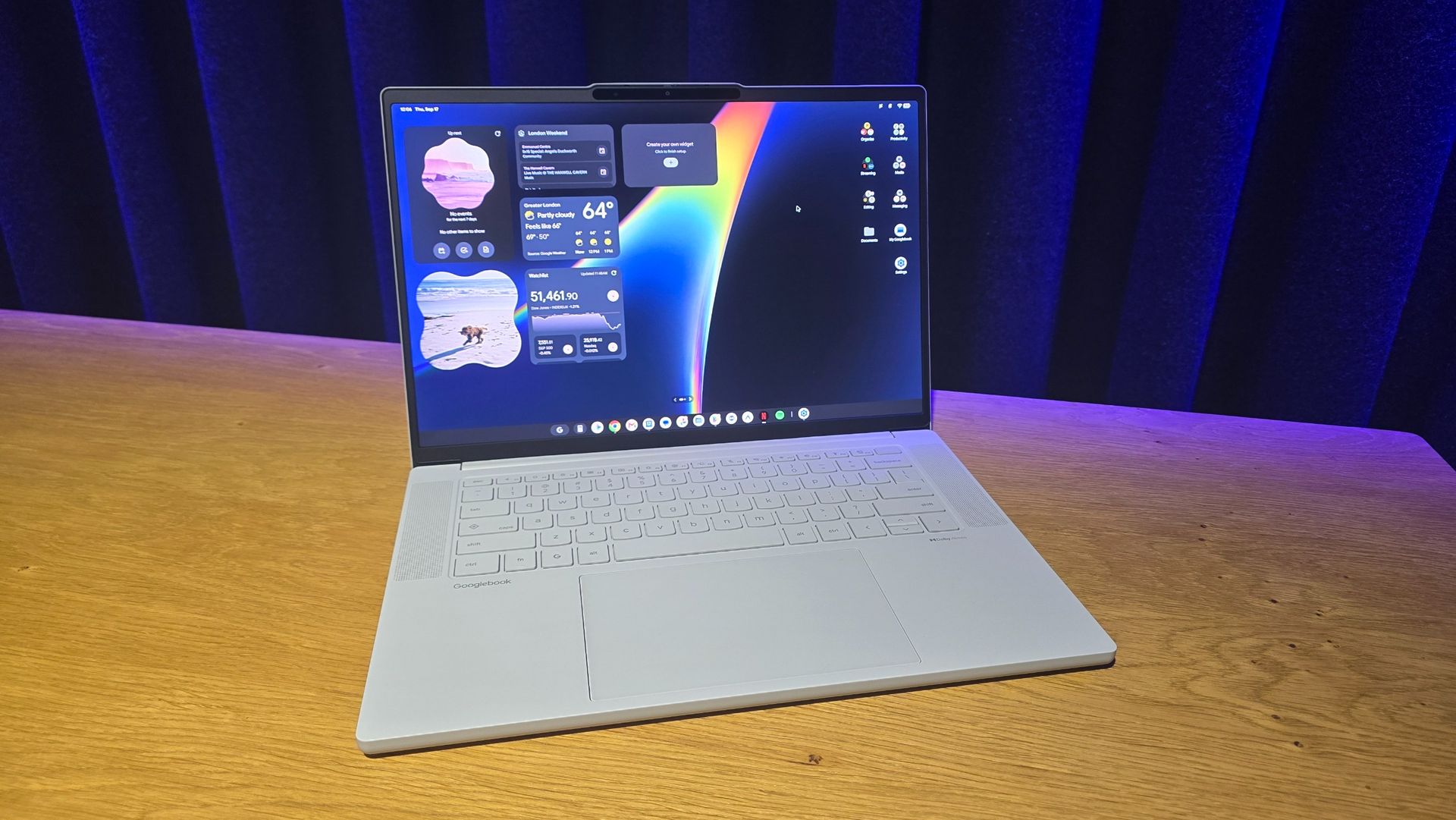
<![CDATA[ <article> <p>I spent quite a bit of this year wondering about Googlebooks. After <a href="https://www.techradar.com/computing/laptops/google-just-delivered-its-first-gemini-centric-platform-in-googlebook-and-it-may-feature-the-first-ai-os">Google announced them in May</a>, things got a little quiet, and I noticed that when I was at the huge <a href="https://www.techradar.com/tag/computex">Computex 2026</a> show in Taiwan, no one seemed to be talking about them — <a href="https://www.techradar.com/computing/computing-components/watch-out-apple-nvidia-just-unveiled-its-rtx-spark-arm-superchip-to-take-on-the-m5-at-computex-2026">Nvidia’s RTX Spark ARM chip</a>, and Windows 11 competitors to the (then recently-released) <a href="https://www.techradar.com/computing/macbooks/apple-macbook-neo">MacBook Neo</a>, were the talk of Taipei.</p><p>Computex would have been the ideal event for Google and its hardware partners to hype up Googlebooks, if only to give us a bit of a tease. Instead, the silence made me worry that they could end up being another Google product that quickly gets forgotten about.</p><p>So, when rumors of an <a href="https://www.techradar.com/computing/laptops/after-months-of-silence-the-first-googlebook-has-been-spotted-and-it-looks-nifty-but-will-anyone-really-care">impending Googlebook launch</a> started cropping up a month or so ago, I was very interested. However, with information still so thin on the ground, no one was really sure <em>what</em> a Googlebook would be. Would they be budget laptops designed to replace <a href="https://www.techradar.com/news/best-chromebook">Chromebooks</a>? Or, might they be mid-rangers aimed at taking on the MacBook Neo?</p><p>Well, now that we have pricing information, and I’ve spent time with the five Googlebooks that will go on sale on October 5, I can confirm that Googlebooks are neither of those things — instead, they’re premium <a href="https://www.techradar.com/news/mobile-computing/laptops/best-ultrabook-18-top-thin-and-lights-1054355">thin and light laptops</a> designed to rival the <a href="https://www.techradar.com/computing/macbooks/apple-macbook-air-13-inch-m5-review">MacBook Air</a>, and Windows 11-powered Ultrabooks. And that makes them all the more interesting. </p><figure class="van-image-figure inline-layout" data-bordeaux-image-check ><div class='image-full-width-wrapper'><div class='image-widthsetter' style="max-width:2560px;"><p class="vanilla-image-block" style="padding-top:56.29%;"><img id="BYdV6owpoyTWzXv4U2pBiX" name="20260917_120530" alt="Googlebook launch at Google HQ, London" src="https://cdn.mos.cms.futurecdn.net/BYdV6owpoyTWzXv4U2pBiX-1920-80.jpg" mos="" align="middle" fullscreen="" width="2560" height="1441" attribution="" endorsement="" class="inline"></p></div></div><figcaption itemprop="caption description" class=" inline-layout"><span class="credit" itemprop="copyrightHolder">(Image credit: Future)</span></figcaption></figure><h2 id="more-ambitious-than-a-chromebook">More ambitious than a Chromebook</h2><p>With the cheapest Googlebook, the Acer Googlebook 14, starting at $899 / £999 (around AU$1,899), you might be disappointed that these aren’t going to be ultra-affordable Chromebook replacements, especially at a time when prices of everything, especially tech, seems to be climbing.</p><p>However, as multiple Google employees told me when I visited the company's UK headquarters in London, Googlebooks are <em>not</em> replacing Chromebooks. Instead, Chromebooks will remain the budget, entry-level, laptop choice running Chrome OS, while Chromebook Plus devices will remain the mid-range option.</p><p>Googlebooks, meanwhile, will be the high-end, flagship laptops that run an entirely new operating system — Googlebook OS — while still offering plenty of value for money.</p><p>The $1,000 / £1,000-plus price has allowed Google and its hardware partners to be rather ambitious with these first-generation Googlebooks. Each one (the aforementioned Acer Googlebook 14, plus the Lenovo Googlebook 15, HP Googlebook 14, Dell XPS Googlebook, and Asus Googlebook 14) has a stylish thin and light design, and, depending on the model, offers premium features such as OLED touch displays, haptic touchpads, and fingerprint sensors.</p><figure class="van-image-figure inline-layout" data-bordeaux-image-check ><div class='image-full-width-wrapper'><div class='image-widthsetter' style="max-width:2560px;"><p class="vanilla-image-block" style="padding-top:56.29%;"><img id="Kt6PzTm5stxZFbAygMqEiX" name="20260917_111700" alt="Googlebook launch at Google HQ, London" src="https://cdn.mos.cms.futurecdn.net/Kt6PzTm5stxZFbAygMqEiX-1920-80.jpg" mos="" align="middle" fullscreen="" width="2560" height="1441" attribution="" endorsement="" class="inline"></p></div></div><figcaption itemprop="caption description" class=" inline-layout"><span class="credit" itemprop="copyrightHolder">(Image credit: Future)</span></figcaption></figure><p>Each Googlebook also has a ‘Glowbar’, which is an LED stripe located on the back of the lid that can light up in a variety of ways depending on what you’re doing on the Googlebook. Described by John Maletis, Google’s VP Laptops and Tablets, at the launch event I attended, as a ‘distinctively Google design statement’, it adds a nice bit of color to each Googlebook, and I especially liked how it can show the battery level of the device when it’s plugged in and charging.</p><p>In the future, third-party developers will have access to the Glowbar, so that their apps can use the feature, and while I can’t see it being an <em>essential</em> part of the Googlebook experience (remember, the Glowbar is on the back of the laptop’s lid, so usually facing away from the user, limiting its usefulness), it’s a nice little detail that helps these laptops stand out.</p><p>Googlebooks also have premium components to complement their designs. Each one comes with at least 16GB of RAM and a 256GB SSD, and some models will allow for higher configurations up to 32GB of RAM and larger SSDs. They're also powered by high-end chips from Intel (series 3 Core Ultra processors) and Qualcomm (Snapdragon X Elite and X1 Elite chips), and feature NPUs capable of over 45 TOPS (trillions of operations per second) for on-device AI — as you might expect from Google, a big focus of Googlebooks is AI.</p><figure class="van-image-figure inline-layout" data-bordeaux-image-check ><div class='image-full-width-wrapper'><div class='image-widthsetter' style="max-width:2560px;"><p class="vanilla-image-block" style="padding-top:56.29%;"><img id="VdDRfSkLkWpr98xX3fD5AX" name="20260917_120539" alt="Googlebook launch at Google HQ, London" src="https://cdn.mos.cms.futurecdn.net/VdDRfSkLkWpr98xX3fD5AX-1920-80.jpg" mos="" align="middle" fullscreen="" width="2560" height="1441" attribution="" endorsement="" class="inline"></p></div></div><figcaption itemprop="caption description" class=" inline-layout"><span class="credit" itemprop="copyrightHolder">(Image credit: Future)</span></figcaption></figure><p>Thanks to this combination of powerful specs and the lightweight Googlebook OS, Googlebooks feel very fast and responsive in use. While I wasn’t able to run any benchmarks during my time with the new devices, I spent a decent amount of time with each one browsing the web, using apps and even playing some games (admittedly Android games designed for mobile, but even they can be quite graphically impressive these days), and Googlebook OS was fast and fluid, with nary a pause as I opened up multiple apps.</p><p>With Google promising up to 10 years of software support, these Googlebooks could be the last laptop you buy for a long time — and that makes their higher prices slightly more palatable. A 10-year lifespan for a laptop feels very MacBook-like too. </p><figure class="van-image-figure inline-layout" data-bordeaux-image-check ><div class='image-full-width-wrapper'><div class='image-widthsetter' style="max-width:2560px;"><p class="vanilla-image-block" style="padding-top:56.29%;"><img id="8urM9SBEWssMY5iSoZMSjX" name="20260917_114450" alt="Googlebook launch at Google HQ, London" src="https://cdn.mos.cms.futurecdn.net/8urM9SBEWssMY5iSoZMSjX-1920-80.jpg" mos="" align="middle" fullscreen="" width="2560" height="1441" attribution="" endorsement="" class="inline"></p></div></div><figcaption itemprop="caption description" class=" inline-layout"><span class="credit" itemprop="copyrightHolder">(Image credit: Future)</span></figcaption></figure><h2 id="a-brand-new-operating-system">A brand-new operating system</h2><p>Perhaps the most exciting thing about Googlebooks is that they're running on an entirely new operating system, Googlebook OS, rather than simply using Google’s Chrome OS software.</p><p>While Chrome OS has come on in leaps and bounds since its inception, Google’s lightweight operating system built around its Chrome web browser has plenty of limitations. While these limitations have helped keep hardware requirements and costs down, making Chromebooks excellent budget laptops, they can also be frustrating for users. It’s the main reason why I stopped using my Google Pixelbook Go, one of my favorite laptops ever, as my daily driver some years ago.</p><p>Googlebook OS combines the best things about Chrome OS, namely its lack of bloat, with Google’s other incredibly popular operating system, Android, to create something entirely new. Built on Linux, and making use of the higher hardware specs of Googlebooks, Googlebook OS is a fully-fledged desktop operating system that really feels like it can compete with <a href="https://www.techradar.com/reviews/windows-11">Windows 11</a> and <a href="https://www.techradar.com/computing/mac-os/the-best-hidden-macos-27-features-people-arent-talking-about">macOS</a>.</p><figure class="van-image-figure inline-layout" data-bordeaux-image-check ><div class='image-full-width-wrapper'><div class='image-widthsetter' style="max-width:2560px;"><p class="vanilla-image-block" style="padding-top:56.29%;"><img id="aR2jAThdbpnCGQMFJAefGX" name="20260917_111845" alt="Googlebook launch at Google HQ, London" src="https://cdn.mos.cms.futurecdn.net/aR2jAThdbpnCGQMFJAefGX-1920-80.jpg" mos="" align="middle" fullscreen="" width="2560" height="1441" attribution="" endorsement="" class="inline"></p></div></div><figcaption itemprop="caption description" class=" inline-layout"><span class="credit" itemprop="copyrightHolder">(Image credit: Future)</span></figcaption></figure><p>Thanks to the OS's ability to run Android apps, Googlebooks will launch on October 5 with access to millions of apps and games via Google’s Play Store, and there will be a dedicated section of the Play Store for desktop apps. These apps won’t just be mobile Android apps clumsily expanded onto a larger screen, but more complex and capable apps that have been designed for Googlebooks with keyboard and touchpad controls. I imagine at launch that this library of desktop apps will be rather limited, but will hopefully expand quickly, especially if Googlebooks turn out to be a hit.</p><p>At the launch event, I saw how Googlebook OS fixes one of my biggest issues with Chrome OS. Apps for Chrome OS are usually very limited, sometimes requiring an internet connection to run. The Chrome web browser was the mobile version, which meant you couldn’t run extensions, a deal breaker for myself, as I have several extensions I need to run for my job.</p><p>So, one of the first things I did when playing around with a Googlebook was launch Chrome, and I’m happy to report that it’s the full desktop version, so extensions are supported.</p><p>Googlebook OS also has a fast and intuitive file browser app, with built-in AI that allows you to use natural language to search your files. In the example I was shown, you could search for ‘a photo with a dog in it’, and Googlebook OS will identify any photo which includes a dog, rather than just going off file names or tags. It’s the kind of responsive and easy-to-use search that Microsoft has long promised in Windows 11, but has never managed to nail. Google has made it look easy.</p><p>While Googlebook OS is a new operating system, the aim, according to Alex Kuscher Senior Director, Laptops and Tablets at Google, is to create “a laptop that feels familiar to Android users”.</p><figure class="van-image-figure inline-layout" data-bordeaux-image-check ><div class='image-full-width-wrapper'><div class='image-widthsetter' style="max-width:2560px;"><p class="vanilla-image-block" style="padding-top:56.29%;"><img id="SGTD4aNWv4msW2qQ4unBQX" name="20260917_120617" alt="Googlebook launch at Google HQ, London" src="https://cdn.mos.cms.futurecdn.net/SGTD4aNWv4msW2qQ4unBQX-1920-80.jpg" mos="" align="middle" fullscreen="" width="2560" height="1441" attribution="" endorsement="" class="inline"></p></div></div><figcaption itemprop="caption description" class=" inline-layout"><span class="credit" itemprop="copyrightHolder">(Image credit: Future)</span></figcaption></figure><p>That means an interface that, despite being built for desktops, looks a lot like Android on smartphones. It uses the same Material 3 Expressive interface, and widgets, menus and settings should be recognizable to anyone who's used a modern Android device. The fact that every Googlebook comes with a touchscreen means there should only be a small learning curve for Android users.</p><p>Of course, if you use a version of Android that’s heavily modified, such as with the OneUI interface found on Samsung devices, things won’t be <em>quite</em> as similar, as the Googlebook OS interface is very much based on the stock Android you find on Google’s own Pixel series of devices. Still, anyone who's used an Android device should find Googlebook OS easier to pick up and use compared to Windows or macOS… or even Chrome OS.</p><p>Googlebooks and Android devices will also work seamlessly with each other, so once paired, you’ll be able to access and launch apps and files from your smartphone on a Googlebook, even allowing you to carry on where you left off on one device when switching to another.</p><p>I saw this in action with a few apps, and it looked like it worked very well. It was intuitive and slick, and finally offers the kind of interoperability between mobile device and laptop that Android users have been wanting. If you’ve ever been jealous of how well MacBooks and iPhones work with each other as an Android user, then a Googlebook is definitely worth considering.</p><p>One thing to note is that, while you’ll be able to see and reply to text messages your Android phone receives on your Googlebook, you won’t be able to make and answer calls. A Google employee told me this is for security reasons; however, iPhone users can answer their iPhone through macOS, so if Apple has found a way to do this securely, I’m sure Google will figure it out as well. I was also assured that WearOS devices, such as the <a href="https://www.techradar.com/health-fitness/smartwatches/google-pixel-watch-5-review">Pixel Watch 5</a>, will get some sort of compatibility with Googlebooks as well, but that feature will come in the future.</p><p>Based on my time with the first tranche of Googlebooks, I've been impressed with the Apple-like way in which they work with Android devices. If anyone has tried the rather clumsy way Windows 11 works with Android, the way Googlebook OS handles things will be a revelation. Previously, only Samsung got close to this kind of ecosystem, but that relied on using Samsung apps and devices. The Googlebook OS way of doing things feels far more natural.</p><p>It's also hard to overstate how big a deal a new operating system to challenge the dominance of Windows (and to a lesser extent, macOS) on laptops is. Many people have been growing frustrated with Windows 11’s instability and bloat, and while Googlebook OS also features heaps of AI (a common complaint of Windows 11 these days), it does so in a less obtrusive way. It certainly feels like Googlebook OS was built to incorporate AI, rather than it being bolted on, as with Windows 11 (which, to be fair to Microsoft, was launched before AI really took off).</p><p>The Magic Pointer feature, for example, brings up Google’s Gemini AI with a shake of mouse cursor, and while I don’t think this is a killer feature, it’s at least easy to ignore if you don’t need it (and just as easy to use if you do).</p><figure class="van-image-figure inline-layout" data-bordeaux-image-check ><div class='image-full-width-wrapper'><div class='image-widthsetter' style="max-width:2560px;"><p class="vanilla-image-block" style="padding-top:56.29%;"><img id="uNMMKDbnzRUF8vTpHWXWiX" name="20260917_111624" alt="Googlebook launch at Google HQ, London" src="https://cdn.mos.cms.futurecdn.net/uNMMKDbnzRUF8vTpHWXWiX-1920-80.jpg" mos="" align="middle" fullscreen="" width="2560" height="1441" attribution="" endorsement="" class="inline"></p></div></div><figcaption itemprop="caption description" class=" inline-layout"><span class="credit" itemprop="copyrightHolder">(Image credit: Future)</span></figcaption></figure><p>New Googlebooks will come with 12 months of Gemini Spark — <a href="https://www.techradar.com/ai-platforms-assistants/i-tried-gemini-spark-in-chrome-and-its-the-perfect-ai-for-handling-all-the-boring-bits-online">Google's personal AI agent</a> — which is a nice added value, though I worry how much of Googlebook OS’ AI features will suddenly become unusable when those 12 months are up and you don’t resubscribe. </p><p>Also, while Googlebook OS feels lightweight thanks to the lack of preinstalled ‘bloatware’ and speed, it offers plenty of depth as well, with full Terminal access, support for Linux containers, and access to Google’s Antigravity tool for coding your own apps. The Create My Widget feature, currently in beta, lets users make their own desktop widgets using natural-language prompts.</p><p>So, it looks like Googlebook OS could be the best example yet of a lightweight operating system that doesn’t feel limiting for more advanced users. The integration between Googlebooks and Android devices is also impressive, and perhaps the thing that both Microsoft and Apple should be most worried about, as there are a lot of Android device owners looking for a laptop that works this well with their smartphone.</p><p>There’s no doubt that Googlebooks are going to be impressive laptops, and I left the event increasingly confident that pitching Googlebooks to compete with MacBook Airs (especially after Apple has raised the price of its laptops) rather than limiting them to budget laptops, is a canny move. We’ll be getting all of the new Googlebooks in for review soon at TechRadar, but from my early time with them, I would advise any Android owner who's currently thinking about buying a new laptop to hold fire until October 5.</p> </article> ]]>
Read the full article on TechRadar
Read Full Article →