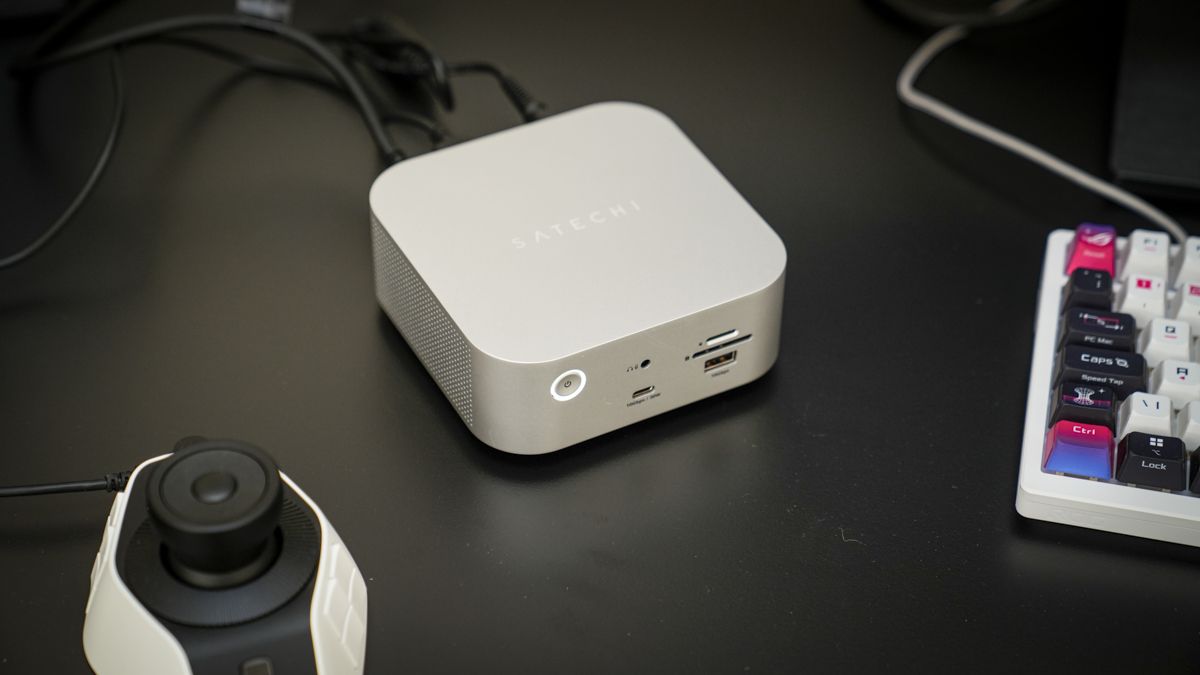
Satechi Thunderbolt 5 CubeDock review: I finally found the ultimate docking station for creatives
Satechi Thunderbolt 5 CubeDock: 30-second review The Satechi Thunderbolt 5 CubeDock is one of a new wave of high-performance docks that offer ultra-fast connectivity and the option to add internal storage.
<![CDATA[ <article> <h2 class="article-body__section" id="section-satechi-thunderbolt-5-cubedock-30-second-review"><span>Satechi Thunderbolt 5 CubeDock: 30-second review</span></h2><p>The Satechi Thunderbolt 5 CubeDock is one of a new wave of high-performance docks that offer ultra-fast connectivity and the option to add internal storage. The design is reminiscent of the Mac Mini range with its cubed compact aluminium design that sees a single Thunderbolt 5 cable running from the dock to your computer, and once done, adds three more Thunderbolt 5 ports, alongside a spread of USB, UHS-II card readers, 2.5GbE Ethernet, audio, and up to 140W of charging.</p><p>The big features here are the Thunderbolt 5 connection and the option to add an M.2 NVMe SSD, changing this from a high-performance hub into an SSD enclosure. The SSD must be purchased separately; it comes in a model with up to 8TB of capacity and takes less than a minute to screw into place. Satechi has included everything you need, including a screwdriver and thermal pads. </p><p>Once the SSD is installed and all desktop cables are connected, it's a neat solution that enables you to connect monitors, control boards, speakers, network connections, and additional drives in a matter of seconds. </p><p>This makes it a great solution if you’re a photographer or video editor and need to offload files quickly after a day's shoot, though it's disappointing that the network is limited to 2.5GbE, whereas many other premium docks have already adopted 10GbE. Despite that, for creators, I found it to be the <a href="https://www.techradar.com/news/the-best-laptop-docking-stations" target="_blank">best docking station</a> I've tested. </p><p>At the price, however, this doc is well balanced; you do need a Thunderbolt 5 to get the most out of it. On anything slower, Thunderbolt 4, USB4 and so on, it still works, but the speeds drop dramatically. </p><p>In this test, I utilised an Asus Prime-based machine fitted with a Thunderbolt 5 card to check the speeds. It’s also worth noting that in an editing environment where you want everything to be as quiet as possible, there is an active fan that helps keep the SSD cool, but unfortunately, it adds a little noise under load. </p><p>If you use the CubeDock with the right machine and have an SSD installed, it’s one of the neatest ways I've come across to turn a laptop into a full creative workstation, storage included, from a single cable. </p><h2 class="article-body__section" id="section-satechi-thunderbolt-5-cubedock-price-and-availability"><span>Satechi Thunderbolt 5 CubeDock: Price and availability</span></h2><ul><li><strong>How much does it cost? </strong>From $399</li><li><strong>When is it out? </strong>Available now</li><li><strong>Where can you get it? </strong>Directly from <a href="https://satechi.com/">Satechi</a> or <a href="https://www.amazon.com/GMKtec-K17-4-5GHz-LPDDR5X-Display/dp/B0GTNN1TL1/?th=1" target="_blank">Amazon</a></li></ul><p>The Satechi Thunderbolt 5 CubeDock with SSD enclosure<a href="https://www.amazon.co.uk/Thunderbolt-CubeDockTM-Compatible-Enclosure-Multi-Displays-Silver/dp/B0H5QN77X2/?th=1"> </a>is priced at $399.99 in the US, <a href="https://satechi.com/products/thunderbolt-5-cubedock-with-ssd-enclosure" target="_blank">available direct from Satechi</a> and <a href="https://www.amazon.com/Satechi-Thunderbolt-CubeDockTM-Compatible-Multi-Displays/dp/B0G7VZKXPZ/" target="_blank">Amazon.com</a>. In the UK, it's up for <a href="https://www.amazon.co.uk/Thunderbolt-CubeDockTM-Compatible-Enclosure-Multi-Displays-Silver/dp/B0H5QN77X2/?th=1" target="_blank">£399.99 at Amazon.co.uk</a>. </p><p>The price is for the dock alone, and if you want to install an M.2 NVMe SSD, then this is a separate purchase, so budget for the drive on top of that.</p><ul><li><strong>Value:</strong> 3.5 / 5</li></ul><figure class="van-image-figure inline-layout" data-bordeaux-image-check ><div class='image-full-width-wrapper'><div class='image-widthsetter' style="max-width:1200px;"><p class="vanilla-image-block" style="padding-top:56.25%;"><img id="9AqMjQ3KXtKmJWYjco8pZD" name="Satechi TB5 CubeDock" alt="Satechi TB5 CubeDock" src="https://cdn.mos.cms.futurecdn.net/9AqMjQ3KXtKmJWYjco8pZD.jpg" mos="" align="middle" fullscreen="" width="1200" height="675" attribution="" endorsement="" class=""></p></div></div><figcaption itemprop="caption description" class=" inline-layout"><span class="credit" itemprop="copyrightHolder">(Image credit: Alastair Jennings)</span></figcaption></figure><h2 class="article-body__section" id="section-satechi-thunderbolt-5-cubedock-specs"><span>Satechi Thunderbolt 5 CubeDock: Specs</span></h2><p><strong>Upstream:</strong> 1 x Thunderbolt 5 (80/120Gbps), up to 140W host charging<br><strong>Downstream:</strong> 3 x Thunderbolt 5 (80Gbps data each, 15W each)<br><strong>SSD enclosure:</strong> M.2 NVMe, 2230/2242/2260/2280, up to 8TB, PCIe 4x4, up to 6000MB/s<br><strong>USB-C:</strong> 1 x 10Gbps (30W), 1 x 10Gbps (7.5W)<br><strong>USB-A: </strong>1 x front 10Gbps (7.5W), 1 x rear 10Gbps (4.5W)<br><strong>Card readers: </strong>SD + microSD, UHS-II, <br><strong>Ethernet: </strong>2.5GbE<br><strong>Audio:</strong> 3.5mm in/out<br><strong>Displays: </strong>up to 8K 144Hz single / triple 8K 60Hz (Windows); up to dual 6K 60Hz (macOS, chip-dependent)<br><strong>Cooling: </strong>active fan, smart curve, 20-40 dB(A)<br><strong>Power</strong>: 180W smart power supply<br><strong>Dimensions: </strong>12.7 x 12.7 x 5.2cm<br><strong>Weight:</strong> 588.9g </p><h2 class="article-body__section" id="section-satechi-thunderbolt-5-cubedock-design"><span>Satechi Thunderbolt 5 CubeDock: Design</span></h2><p>The CubeDock is a compact cube in industry-grade aluminium, measuring 12.7cm square and 5.2cm tall, and weighing a substantial 588.9g, far heavier than you would initially expect and highlighting that this is a permanent office fixture rather than portable. </p><p>The weight is reassuring, especially when it’s sat on your desk, having various accessories and peripherals plugged in. The aluminium build and natural finish look great and have the dual function of durability and passive heatsinking. There’s also an internal fan that's vented to keep everything at a stable temperature.</p><figure class="van-image-figure inline-layout" data-bordeaux-image-check ><div class='image-full-width-wrapper'><div class='image-widthsetter' style="max-width:1200px;"><p class="vanilla-image-block" style="padding-top:56.25%;"><img id="Js9aF3YpUqhMZPTfbEDsZD" name="Satechi TB5 CubeDock" alt="Satechi TB5 CubeDock" src="https://cdn.mos.cms.futurecdn.net/Js9aF3YpUqhMZPTfbEDsZD.jpg" mos="" align="middle" fullscreen="" width="1200" height="675" attribution="" endorsement="" class=""></p></div></div><figcaption itemprop="caption description" class=" inline-layout"><span class="credit" itemprop="copyrightHolder">(Image credit: Alastair Jennings)</span></figcaption></figure><p>On the front and back, there are plenty of ports, and the layout is well thought out, with the connections I most frequently need, such as USB-C, USB-A, and the two card readers, positioned on the front. The permanent connections, such as the Thunderbolt 5 ports, Ethernet, audio, power, and a second USB-A port, are all on the back. </p><p>As ever, there's a Kensington lock slot, too, which is good to see if you do work in a shared office, especially if you install an expensive 8TB SSD. </p><p>That SSD is installed at the base of the dock and requires a screwdriver to access it. Satechi has included everything needed in the box: a small screwdriver, the mounting screws and two thermal pads, so there's no hunting for bits. </p><p>Checking out the cavity where the SSDs slot in, and it’s good to see that the space has been designed to take any M.2 NVMe drive from 2230 up to 2280, so whatever size you have, the installation process is easy enough. Installing a Crucial T710 took a couple of minutes.</p><p>One surprise is that there are no HDMI or DisplayPort connections for a monitor. Instead, all video runs through the Thunderbolt 5 ports, so if your monitors use either of these connector types, you'll need adapters or cables to connect them. </p><ul><li><strong>Design:</strong> 4.5 / 5</li></ul><figure class="van-image-figure inline-layout" data-bordeaux-image-check ><div class='image-full-width-wrapper'><div class='image-widthsetter' style="max-width:1200px;"><p class="vanilla-image-block" style="padding-top:56.25%;"><img id="B9iUY9hxegxotBSeM6tjZD" name="Satechi TB5 CubeDock" alt="Satechi TB5 CubeDock" src="https://cdn.mos.cms.futurecdn.net/B9iUY9hxegxotBSeM6tjZD.jpg" mos="" align="middle" fullscreen="" width="1200" height="675" attribution="" endorsement="" class=""></p></div></div><figcaption itemprop="caption description" class=" inline-layout"><span class="credit" itemprop="copyrightHolder">(Image credit: Alastair Jennings)</span></figcaption></figure><h2 class="article-body__section" id="section-satechi-thunderbolt-5-cubedock-features"><span>Satechi Thunderbolt 5 CubeDock: Features</span></h2><p>The design of the dock instantly highlights its close affinity with the Mac Mini in style and colour, although it is only available in silver. It’s also compatible with both Mac and PC systems, as long as they have a Thunderbolt 5 port; if not, it's fully backwards compatible with previous Thunderbolt and USB-C ports. </p><p>The feature that sets this apart from the vast majority of other hubs, even those with a Thunderbolt 5 port, is an integrated SSD enclosure. This means that rather than having the dock and then plugging in a separate external SSD, you can have one integrated internally, freeing up a port and also enabling maximum connection speeds. </p><p>If you deal with large files of any type, then having access to fast, readily available storage is essential, especially if you work with video. With an 8TB SSD inside, you'll be able to work off that fast internal storage for editing, offloading cards, and keeping an active project library for recent projects without constantly needing to archive. </p><p>Through the test, I popped in a Crucial T710 1TB, a PCIe Gen5 NVMe M.2 2280, and it’s highlighting that while the enclosure is compatible with the latest Gen5 modules, it runs at PCIe 4x4, which is rated at a maximum of 6000MB/s, so even if the drive is faster, you’ll be limited by that technology. </p><p>The storage is a feature that draws me to this dock, but there’s also the fact that a single-cable connection to your computer is all that’s needed, letting you connect all your devices. This not only helps with the time it takes to connect up in the mornings when you arrive at the office, but also at the end of the day. That one cable to my laptop, and then the Desktop PC enabled me to connect displays, data, networking, and charging. </p><p>On the feature side, there were a couple of points that surprised me, and the first was the display options: there are no HDMI or DisplayPort ports, so adapters will be needed if that’s all your monitors support. However, if you can connect via Thunderbolt 5 to Windows or macOS machines, you have plenty of flexibility and choice. </p><p>On Windows machines you can drive up to three 8K displays; on Mac, it's chip-dependent, with up to dual 6K on capable Apple Silicon and triple-display support reserved for the very newest Pro and Max chips, on my M1 Max, I was limited to two monitors and the speed of the Thunderbolt 4 connection, whereas the desktop equipped with the correct TB5 showed a huge uplift in speed.</p><p>The rest of the feature set is almost what you’d expect from a premium; up to 140W charging back to the host, ideal for my 16-inch MacBook Pro, plus 30W from a front USB-C for a phone or tablet; UHS-II SD and microSD readers great for the GoPro Mission 1 and the Sony A7 IV that I often use and a 3.5mm audio jack. </p><p>The one issue for me is that there's only 2.5GbE Ethernet; at this price, I would have expected at least 5GbE, with the more premium docks now all sporting 10GbE. Thankfully for the now-ageing MacBook Pro M1 Max and me, the dock is fully backwards compatible with Thunderbolt 4, Thunderbolt 3, USB4, and USB-C.</p><p>Another feature worth highlighting is the active cooling, which features a smart fan that only starts up when the dock needs it, keeping the SSD and controllers cooler under load. When working with video in the doc and with an SSD enclosed, the fan did kick in, but the office volume wasn’t overly loud or distracting. </p><figure class="van-image-figure inline-layout" data-bordeaux-image-check ><div class='image-full-width-wrapper'><div class='image-widthsetter' style="max-width:1200px;"><p class="vanilla-image-block" style="padding-top:56.25%;"><img id="ajQpzYGmqLDhKLPGGCphZD" name="Satechi TB5 CubeDock" alt="Satechi TB5 CubeDock" src="https://cdn.mos.cms.futurecdn.net/ajQpzYGmqLDhKLPGGCphZD.jpg" mos="" align="middle" fullscreen="" width="1200" height="675" attribution="" endorsement="" class=""></p></div></div><figcaption itemprop="caption description" class=" inline-layout"><span class="credit" itemprop="copyrightHolder">(Image credit: Alastair Jennings)</span></figcaption></figure><ul><li><strong>Features:</strong> 4 / 5</li></ul><h2 class="article-body__section" id="section-satechi-thunderbolt-5-cubedock-performance"><span>Satechi Thunderbolt 5 CubeDock: Performance</span></h2><p>I tested the CubeDock with my MacBook Pro M1 Max, with a Crucial<a href="https://camerajabber.com/reviews/crucial-t710-1tb-review/">T710 1TB</a> installed in the enclosure. I also tested on an M1 Max-equipped machine with Thunderbolt 4, so I was unable to reach the full potential of a Thunderbolt 5-equipped machine. The T710 is a PCIe 5.0 drive. To measure the CubeDock at its full Thunderbolt 5 potential, I've connected it to the Thunderbolt 5-equipped Asus ProArt.<br><br>Setting the CubeDock up is easy enough, and I opted to install the Crucial T710 from the outset. This took a few minutes, and it was good to see that a screwdriver had been supplied along with thermal pads to help with the heat dissipation. Once installed and all cables were connected to the dock, I connected my MacBook Pro M1 Max via the Thunderbolt cable included in the box.</p><p>After a couple of seconds, the Crucial drive appeared on the desktop, as it had already been formatted. The monitor also sprang to life, and I had a direct connection to the network, albeit limited to 2.5GbE. That single-cable connection is something I use extensively in the office, with two permanently fixed docks: one for the MacBook Pro and the other for the Asus desktop. They just make everything so much cleaner, cut down on cables and increase the speed at which I can connect, especially with the laptop.</p><p>On the M1 Max, while the docking is handy, I’m used to that feature with the other docks, but here, having the internal storage was definitely a great addition. However, as the MacBook Pro M1 Max runs Thunderbolt 4, the T710 was never going to reach its full potential, and combined with the enclosure's PCIe 4x4 ceiling, the test results using this setup reflect the connection rather than the drive's or, for that matter, the enclosure's full capability. </p><p>What I will say is that in a real world environment for everyday offloading of memory cards and drives as well working directly from that larger internal SSD drive that I installed, it was a great solution and did highlight that soon it will be time to upgrade to a Thunderbolt 5 machine, although whether that will be a Mac or something else is at the moment very much up for debate.</p><p>While the benchmarks are impressive, they're far from the potential of the Dock, so for the real TB5 test I’ve connected to the ProArt desktop, here the speeds take a massive increase in speed and for any creative environment this dock not only works as a handy dock adding in ports that are easily accessible, but also takes the place of a fast working drive in a small desktop box. </p><p>What impressed me was the Benchmark tests that showed transfer speeds from the internal SSD that I had installed, of 4622.50 MB/s Read, 3721.54 MB/s Write.</p><p>Connecting a Thunderbolt 5 external SSD through the dock showed speeds of 4332.44 MB/s Read, 2748.33 MB/s Write.</p><p>On the MacBook Pro M1 Max with Thunderbolt 4 this reduced to 3441.50 MB/s Read, 1752.96 MB/s Write.</p><p>Connecting a Thunderbolt 5 external SSD through the dock showed speeds of 3445.34 MB/s Read, 1659.22 MB/s Write.</p><p>All very impressive. Alongside the SSD speeds and connectivity to connected and internal drives, there are also SD card slots, both of which are UHS-II and rated to 312 MB/s. </p><p>In the test, I offloaded a USH-II Lexar Professional Silver Pro 512GB card containing images captured on the Sony A7 IV, with transfer speeds of 243.76MB/s read and 104.68MB/s write. After recently coming across a premium hub that dropped to UHS-I, it's good to see proper UHS-II readers here.</p><p>Some of the other connections are also worth noting, and for use with laptops, 140W charging and networking are both handy, although, as stated before, I wish that the networking had been rated at the 5GbE, but still 2.5GbE still enables quick transfers to achieve NAS, just not quite the speeds I’d like for network video editing. </p><p>During the test, with transfers to and from the dock to the SSD I had installed, the internal temperatures did rise due to the load; however, the active fan kicked in quietly and kept the temperatures in check. The noise from the dock really wasn’t an issue. </p><ul><li><strong>Performance:</strong> 4 / 5</li></ul><figure class="van-image-figure inline-layout" data-bordeaux-image-check ><div class='image-full-width-wrapper'><div class='image-widthsetter' style="max-width:1200px;"><p class="vanilla-image-block" style="padding-top:56.25%;"><img id="RaYUiXLDSNJMufGnXxEUPD" name="Satechi TB5 CubeDock" alt="Satechi TB5 CubeDock" src="https://cdn.mos.cms.futurecdn.net/RaYUiXLDSNJMufGnXxEUPD.jpg" mos="" align="middle" fullscreen="" width="1200" height="675" attribution="" endorsement="" class=""></p></div></div><figcaption itemprop="caption description" class=" inline-layout"><span class="credit" itemprop="copyrightHolder">(Image credit: Alastair Jennings)</span></figcaption></figure><h2 class="article-body__section" id="section-satechi-thunderbolt-5-cubedock-final-verdict"><span>Satechi Thunderbolt 5 CubeDock: Final verdict</span></h2><figure class="van-image-figure inline-layout" data-bordeaux-image-check ><div class='image-full-width-wrapper'><div class='image-widthsetter' style="max-width:1200px;"><p class="vanilla-image-block" style="padding-top:56.25%;"><img id="pY2AkiW9zuUnzuaaEan5MD" name="Satechi TB5 CubeDock" alt="Satechi TB5 CubeDock" src="https://cdn.mos.cms.futurecdn.net/pY2AkiW9zuUnzuaaEan5MD.jpg" mos="" align="middle" fullscreen="" width="1200" height="675" attribution="" endorsement="" class=""></p></div></div><figcaption itemprop="caption description" class=" inline-layout"><span class="credit" itemprop="copyrightHolder">(Image credit: Alastair Jennings)</span></figcaption></figure><p>The Satechi Thunderbolt 5 CubeDock is a great bit of kit, both in function and style and what stood out to me was the integrated SSD enclosure that enables direct fast storage that’s essential for most laptop users, especially those working on MacBooks. </p><p>Having that storage option in the dock itself, albeit you need to supply your own SSD, helps keep things neat, so there’s never a need to plug in an external SSD, since the storage is already contained within the hub, ready to go as soon as you connect. It just makes it all a little more permanent. </p><p>The remaining connection ports, including the two UHS-II readers and the 2.5GbE networking, combine to offer a well-rounded package and a perfect option for any professional environment, especially for those in the creative sector. </p><p>However, as a dock, it’s expensive at $399.99. This is a combined dock and enclosure, and, of course, you also need to consider the price of the SSD you pop in. You also need a Thunderbolt 5 machine, although it is backwards compatible, to take full advantage of the speeds on offer. </p><p>My Thunderbolt 4 MacBook Pro M1 Max, while limited in speed, did benefit from additional storage capacity and connection options. I’d also highlight that it’s worth checking your monitors to ensure they have a USB-C display connection, as there is no HDMI or DisplayPort; however, I found Ugreen cables for less than £10 each.</p><p>If you're running a Thunderbolt 5 machine and want a single, compact dock that handles your displays, data, networking, charging, and storage at once, then the CubeDock is a great option, especially when you look at the price compared with some of the other Thunderbolt 5 docks on the market. </p><h3 class="article-body__section" id="section-should-i-buy-the-satechi-thunderbolt-5-cubedock"><span>Should I buy the Satechi Thunderbolt 5 CubeDock?</span></h3><div ><table><tbody><tr><td class="firstcol " ><p>Value</p></td><td ><p>Despite initially seeming like an expensive dock, once you weigh up the features, it’s extremely well priced. </p></td><td ><p>3.5</p></td></tr><tr><td class="firstcol " ><p>Design</p></td><td ><p>Reflective of the Mac Mini, the weight and size make this a great desktop option with a premium build and the option to install an SSD</p></td><td ><p>4.5</p></td></tr><tr><td class="firstcol " ><p>Features</p></td><td ><p>Integrated NVMe enclosure, 140W charging, UHS-II card readers and single cable connection to your machine</p></td><td ><p>4</p></td></tr><tr><td class="firstcol " ><p>Performance</p></td><td ><p>To make the most of the speed, you need Thunderbolt 5, and it is a good, balanced option</p></td><td ><p>4</p></td></tr><tr><td class="firstcol " ><p>Overall</p></td><td ><p>A great dock that will be a perfect partner for any creative, an upgrade in the network speed is really the only small downside.</p></td><td ><p>4</p></td></tr></tbody></table></div><h2 id="buy-it-if">Buy it if...</h2><div class="product"><p><strong>You have a Thunderbolt 5 machine and want built-in storage.</strong></p><p>The integrated NVMe enclosure means one compact cube handles your displays, data, charging and fast storage from a single cable, no separate external drive cluttering the desk. </p><p><strong>You offload fast camera cards daily.</strong></p><p>The UHS-II SD and microSD readers run at up to 312MB/s, so cards from a modern mirrorless body offload at full speed rather than crawling through a UHS-I reader often seen on other docks.</p></div><h2 id="don-t-buy-it-if">Don't buy it if...</h2><div class="product"><p><strong>You're on a slower machine or a budget.</strong></p><p>On Thunderbolt 4, USB4 or older, it works but won't reach its full speed, so you'd be paying a premium for potential you can't use. </p><p><strong>Your displays are HDMI or DisplayPort.</strong></p><p>All video runs through the Thunderbolt 5 ports; there's no HDMI or DisplayPort on the dock. If your monitors use those connectors, you'll need adapters, a dock with native HDMI/DP outputs may suit you better.</p></div><p><em>For more professional-grade desktops, we've tested the </em><a href="https://www.techradar.com/news/best-business-desktop-pcs" target="_blank"><em>best business computers</em></a><em>.</em></p> </article> ]]>
Read the full article on TechRadar
Read Full Article →